
Before you start
- An account with the tool. The Haul Planner is a free extra with a Pro, Featured or Sponsored listing, or you can subscribe to it on its own. Sign in and it opens from your dashboard.
- The job-site address. The street address, not just the city: drive times are measured from it. A city or ZIP code works but measures from its center and says so.
- The tons, or the area and depth. If you only know square feet and thickness, the tool converts them.
- Your price per ton at the plants you buy from, for the mix you are paving, and any dump fee the plant charges for old asphalt.
- Your trucking numbers. Trucks you run, the hourly rate, tons per truck and your hauler's minimum hours. You enter these once and they are saved.
- Your crew's cost per hour, and when overtime starts (optional). They let the planner price a paver that waits for trucks, and pick the cheapest number of trucks.
- When your plants close (optional). Most stop loading 30 to 45 minutes before the gates close.
- Your trucks, drivers and weigh tickets (to track a job). Truck numbers, license plates, driver phone numbers and what each truck carries and costs, then the scale tickets as the loads come back.
- The paving date, and your mix temperatures (optional). The date lets the planner fetch the forecast for the day; the temperature the mix leaves the plant and the lowest you will place let it warn you about a long haul.
- Your invoices (for the report). Type what each invoice says after the job and the report shows how it came in against the estimate.
Why price per ton is not enough
The nearest plant is not always the cheapest, and the cheapest mix is not always the cheapest job. A plant 25 minutes farther away can win if its mix is a few dollars a ton lower, and lose again once the trucks are billed by the hour for the longer haul. Add a dump fee for the old asphalt that comes out, which differs from plant to plant, and the answer is rarely obvious from a price sheet.
Three more things move the real cost. A loaded truck is slower than the car Google timed. A crew standing for trucks costs more each hour once the day runs into overtime and double time. And a plant stops loading before it closes, so a late start or a long haul can mean more trucks just to get every load out. A price sheet shows none of them.
Working it out by hand means a drive time for every plant, a cycle time for the trucks, a hauler's minimum, and a spreadsheet you rebuild for each job. The Haul Planner does that for every plant around a job site in one pass, with your own prices and rates, and keeps them saved for the next job.
It is built for asphalt contractors who buy hot mix and haul it themselves or hire it hauled. It is not a price list: it never tells you what a plant will charge. The prices are the ones you have been quoted or have paid.
On a phone or tablet
The Haul Planner is built to be used from a truck cab or a job trailer. It is laid out for a phone with large, easy-to-tap fields, and it installs like an app so it opens full-screen from your home screen. Scanning a weigh ticket uses the phone's own camera, and the field tools (tickets, the arrive and leave taps, the last-load countdown) are the first things you see on a phone.
In Chrome or Edge, use the Install as an app button at the top of the tool. In Safari on an iPhone or iPad, tap Share, then Add to Home Screen. Once installed, the button disappears. It still needs a connection to measure a new job site; a job you have already searched reopens free. A weigh ticket you add, and a truck you tap as arrived or left, with no signal is kept on the phone and sent when the connection returns. Opening the page with no connection is not supported.
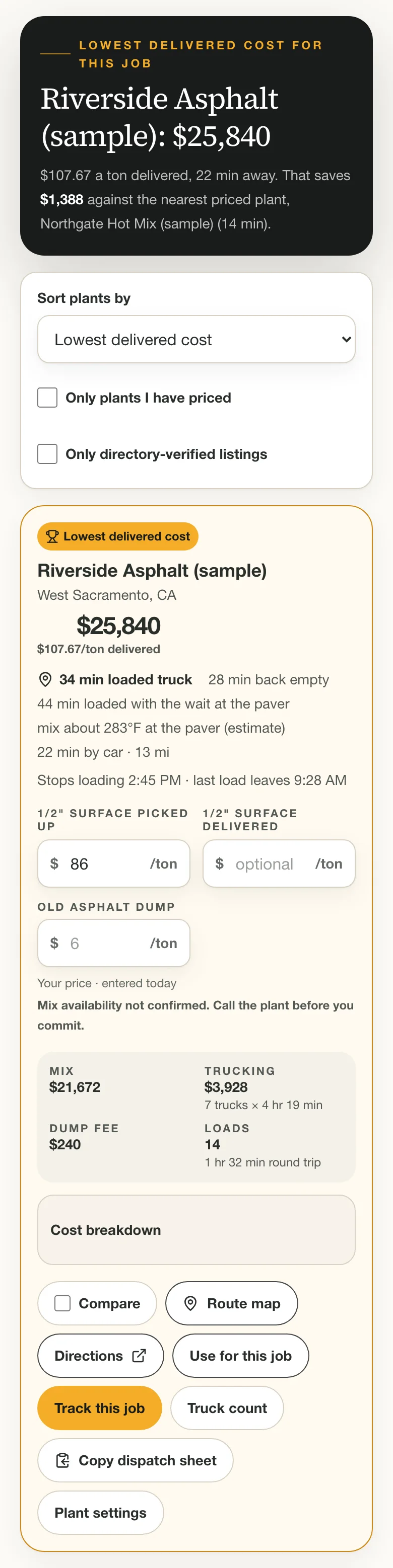
How the total is calculated
The planner is transparent about its arithmetic so you can check it against your own. For each plant:
- Mix
- Tons ordered × your price per ton at that plant. Tons ordered is the job's tons plus your waste percent.
- Trucking
- Trucks × hours billed × your hourly rate. Hours billed is the longer of the job's length and your hauler's minimum. Trucks are billed at one flat hourly rate, waiting included.
- Crew waiting
- When trucks cannot keep the paver fed, the crew stands. The planner prices the crew's day with and without the wait, at your crew cost per hour: regular hours at the rate, then overtime, then double time. The difference is the cost of waiting.
- Short load
- A fee when the last load is lighter than your short-load limit. A plant can set its own.
- Old asphalt
- Tons to dump × that plant's dump fee. A negative fee is a credit. A plant marked as not taking old asphalt is not ranked on a job with a dump.
- Delivered
- If you enter a delivered price, the plant's trucks replace yours: tons ordered × the delivered price, plus the dump fee, with no trucking or crew waiting. The ranking uses whichever of the two is cheaper.
Loads are the tons ordered divided by tons per truck, rounded up. A truck's round trip is loading, the loaded drive out, unloading at the paver and the empty drive back. The drives are the car time stretched by your slowdown: one percentage for the loaded trip, and a separate one for the trip back if you set it.
The planner uses as many trucks as keep the paver working without a gap, up to the most you said you would run. If the plant's last-load time asks for more than that, it adds trucks up to your limit. If you cap the trucks below what the paver needs, the paver waits and the job takes longer, and the crew-waiting line reflects it. A plant that cannot load it all in time is marked and ranked behind the plants that can.
What it leaves out: fuel (unless it is in your rate or other charges), tax, any overtime your hauler bills, and the traffic on the day. Tolls and other trucking charges are counted only when you enter them. The old asphalt rides back empty on the return leg, so it adds no trucking. Weather only moves the cooling cautions; it does not change a price. Treat the total as a way to compare plants against each other under the same assumptions, not as a figure for a bid.
Limits and plans
Every plan has limits, because each new job-site search is a paid lookup. Opening a job you have already searched, and every price, rate and ranking change after the search, is free and never counts.
A Pro, Featured or Sponsored listing includes the tool at no extra cost: 15 a week on Pro, 20 on Featured, 30 on Sponsored new job sites, with plants up to 90 minutes out, 40 measured per search, 30 plants of your own and 12 mixes.
The standalone subscription, for an account with no listing, allows 10 new job sites a week, plants up to 60 minutes out, 25 measured per search, 10 plants of your own and 6 mixes.
Everything after the search does not use one and is the same on every plan: up to 500 jobs, 30 trucks and 2000 tickets on a job. The paving-day forecast is limited to a few dozen requests an hour so it cannot be run in a loop.

If something doesn't work
- The address can't be placed
- The message says what is missing. Usually it is the state or the city: use a street address with its city and state, such as "1200 Main St, Springfield, IL", or a ZIP code. A city or ZIP code works but measures from its center.
- No plants found
- Search within a longer time, or add a plant you buy from under Your plants. The directory only lists plants that make hot mix.
- Weekly limit reached
- A new job site opens again as the week rolls over. A job you have already searched still opens free, and you can keep entering prices on it.
- A plant shows "enter a price"
- It has no price for the selected mix. Type your price per ton on its card and it joins the ranking. Prices are saved per mix.
- A plant is missing
- You may have hidden it. Open Settings, look under Hidden from your searches and press Show again, then search again.
- I moved a plant and its time didn't change
- Plants are re-measured on the next search. Press Search again; the notice "Plants changed. Search again to measure them." shows while one is waiting.
- "Drive times cannot be measured right now"
- A temporary problem on our side. Wait a few minutes and try again; jobs you have already searched are unaffected.
- My changes aren't saving
- Changes save automatically a moment after you stop typing, when you have a connection. If you reach your plan's plant or mix limit, remove one before adding another.
- A plant says "Cannot load it all today"
- Even your most trucks cannot get every load out before the plant stops loading. Start earlier, raise Trucks (most you'll run), pick another plant, or enter a delivered price and let the plant haul it. If the plant's hours are wrong, correct them in Plant settings.
- The truck count table has no "cheapest" row
- Enter your crew's cost per hour under Slowdown, crew pay and fees. Until then waiting looks free, so fewer trucks always look cheaper and the planner will not name one.
- The ticket scan read it wrong, or won't start
- Retake the photo flat, in good light, with the whole ticket in frame, or fix the fields by hand before you save: nothing is saved until you do. The first scan downloads the reading engine (about 10 MB), so it can take a minute on a slow connection. If scanning isn't available on your device, type the ticket in.
- A ticket says it is already in
- A ticket with the same number, plant and day as one already entered is stopped so a load is not counted twice. If it really is a different ticket, tick This is a different ticket and save it. If you entered the wrong one, void it (with a reason) and enter it again.
- A ticket shows Waiting to send
- It was added with no signal and is kept on the phone. It sends by itself when the connection returns, or press Send now. Closing the page does not lose it, but changing or voiding a ticket needs a connection.
- The forecast won't load
- The job needs a Planned paving date and a located address (run Find plants and compare once). The Weather Service covers the United States and about a week ahead, so a date beyond that, or outside the country, has no forecast: set the weather by hand.
- The actual total says pending
- It appears once every cost the estimate expected has an invoice figure under Costs: estimated and actual. Type a figure for each line, or a 0 where the cost really was nothing.
- A ticket lands on the wrong truck, or none
- Add the truck under Your trucks and drivers with its number and license plate exactly as the ticket prints them. A ticket is matched by plate first, then by number.
- Cycle times show no typical cycle
- A cycle is the time between two tickets from the same truck, so each truck needs at least two tickets with times, and the typical figure needs 3 cycles in all. Tickets with no time count toward tons but not toward cycles. The haul and the time at the job need the Reached the job and Left the job taps.
- Cycle times say my trucks are slower than my plan
- A cycle counts the plant queue and the wait at the paver as well as the drive, so look at the haul on its own. If the day was ordinary, press Use [percent] for my plans; if it was not, leave your slowdown alone.
- The tool isn't included in my account
- It comes with a Pro, Featured or Sponsored listing, or as a standalone subscription. See the Haul Planner page to subscribe.
Haul Planner: common questions
What is the Haul Planner?
A tool for asphalt contractors that compares the hot mix plants around a job site by delivered cost: your price per ton, trucking billed by the hour, and old-asphalt dump fees, using road drive times from the job site.
Does it tell me what a plant will charge?
No. Plant prices come from you, from quotes you have received or what you have paid. The planner does the drive times, the trucking arithmetic and the ranking.
How much does the Haul Planner cost?
It is included free with a Pro, Featured or Sponsored listing. On its own it is $14.99/month or $149/year, with smaller limits: 10 new job-site searches a week.
How many job sites can I search?
15 a week on Pro, 20 on Featured, 30 on Sponsored for new job-site addresses each week, and 10 a week on the standalone subscription. Reopening a job you have already searched is free.
How are the drive times measured?
By road, from the job-site address to each plant, with typical traffic and for a passenger car. The planner stretches that for a loaded truck by a percentage you set. It never uses straight-line distance.
Can I add my own plant or yard?
Yes. Add it by address or coordinates under Your plants. It is measured on the next search, ranked like any other plant and keeps its prices. Up to 30 on a listing plan, 10 on the standalone subscription.
How do I know how slow my trucks are?
Many contractors put it somewhere between 25 and 50 percent slower than a car, but it depends on the grades, the stops and the road, so start with your best guess. Then track a job: tap each truck when it reaches the job, and the cycle times card works out how slow the loaded haul really was and offers it as your slowdown. It is a starting point either way.
Does it handle crew overtime and double time?
Yes, for the crew's waiting time. You enter what your crew costs per hour while the paver waits for trucks, the hours in a regular day, when overtime starts and what it pays, and when double time starts and what it pays. The planner prices the day with and without the wait, so waiting that pushes a long day into overtime costs more than waiting early in it. Trucks are billed at one flat hourly rate.
Does it know when the plant closes?
It knows when you tell it. Set when plants close, and how many minutes before closing they stop loading, and every card shows the last load. If your trucks cannot get every load out in time it adds trucks up to your limit, and a plant that still cannot load it all is marked and ranked behind the ones that can. Each plant can have its own hours.
Can I compare a plant that delivers with hauling it myself?
Yes. Enter the plant's delivered price per ton next to your picked-up price. The card shows the total both ways and which is cheaper for this job, and the ranking uses the cheaper of the two.
Can it track my trucks and scale tickets?
Yes. Track Deliveries keeps your trucks, plates and drivers, takes each weigh ticket by scan or by hand (in tons, pounds, tonnes or kilograms), totals the tons delivered against the order, times the haul, the wait at the job and the whole cycle from your taps and tickets, and alerts you when trucks are short, the route is slowing or the job is behind its plan. A duplicate ticket is stopped, and a wrong one is voided with a reason and kept, never deleted.
Is my weigh ticket photo uploaded?
The photo is read by your browser on your own phone, and nothing is saved until you check the numbers and save the ticket. When you save, the photo is kept with the ticket in storage only your account can read, so you can open it later; it is never shown publicly. A ticket you void keeps its photo.
Does it work with no signal?
Partly. A weigh ticket you add, and a truck you tap as arrived or left, is kept on the phone and sent when the connection returns. Measuring a new job site, fetching the forecast, and changing or voiding a saved ticket need a connection, and the page itself has to be open: it does not load with no connection.
Does it know the weather and the mix temperature?
It fetches the National Weather Service's hourly forecast for the job's paving date (United States, about a week ahead) when you ask, and checks it against the lowest air temperature you pave in. It estimates the mix temperature at the paver from the temperature leaving the plant and the time in the truck with a rough model that you can replace with your own measured loss from tickets. It is an aid for spotting a risk, not a thermal model.
Can I report on a job and export it?
Yes. Reports sets the estimate you saved beside the weigh tickets and the invoice figures you type in, line by line, and downloads the job report and its tickets as CSV, prints the report or saves it as a PDF, and lists every saved job with its estimate and actual total. Nothing in the actual column is filled in from the plan.
Is my pricing private?
Yes. Your prices, rates, notes and the plants you add are saved to your own account and are not shown on any public page or to any other company.
Can I use it on my phone?
Yes. It is laid out for a phone and installs like an app: Install as an app in Chrome or Edge, or Share then Add to Home Screen in Safari on an iPhone or iPad.
A comparison aid, not a quote: The Haul Planner is a comparison aid, not a quote. Plant prices, hauler invoices and real drive times (traffic, scales, queues at the plant) all differ from what is entered. The screenshots on this page use sample data and fictional plants; none shows a real price. Confirm price, load-out hours and mix availability with the plant before you commit a job.
Ready to compare plants for your next job?
Included free with a Pro, Featured or Sponsored listing, or $14.99/month ($149/year) on its own.
Open the Haul Planner